Update 4 June 2013:
I might return to this later and have a look at how to make the
parallel executable in the bin/LINUX64 folder.
Original post:
This is another addition to my growing list over
unsuccessful, abandoned or only partially successful builds.
(see e.g.
http://verahill.blogspot.com.au/2013/05/409-failed-attempt-at-compiling-gamess_10.html
http://verahill.blogspot.com.au/2013/05/409a-failed-attempt-at-compiling-gamess.html
http://verahill.blogspot.com.au/2012/08/compiling-dalton-qm-on-debian-in.html
http://verahill.blogspot.com.au/2012/07/quantum-espresso-on-rocks-543-centos-56.html)
In other words -- yes, it builds. But no,
it is unusable.
I can build nwchem with openmp support, and it does run in parallel -- but the wall time is enormous since most of the time only a single thread is running.
Maybe someone will read this and see what's missing, or feel inspired to make their own attempt
What I did
ACML libraries were installed as shown in e.g.
http://verahill.blogspot.com.au/2013/05/409-failed-attempt-at-compiling-gamess_10.html
Nwchem was downloaded:
sudo mkdir /opt/nwchem
sudo chown $USER:$USER /opt/nwchem
cd /opt/nwchem
wget http://www.nwchem-sw.org/download.php?f=Nwchem-6.1.1-src.2012-06-27.tar.gz
tar xvf Nwchem-6.1.1-src.2012-06-27.tar.gz
cd nwchem-6.1.1-src/
Next I edited src/config/makefile.h
2363 ifdef OPTIMIZE
2364     FFLAGS = $(FOPTIONS) $(FOPTIMIZE)
2365     CFLAGS =  $(COPTIONS) $(COPTIMIZE) -fopenmp
2366 else
2367 # Need FDEBUG after FOPTIONS on SOLARIS to correctly override optimization
2368     FFLAGS = $(FOPTIONS) $(FDEBUG)
2369     CFLAGS = $(COPTIONS) $(CDEBUG) -fopenmp
2370 endif
2371   INCLUDES = -I. $(LIB_INCLUDES) -I$(INCDIR) $(INCPATH)
2372   CPPFLAGS = $(INCLUDES) $(DEFINES) $(LIB_DEFINES)
2373    LDFLAGS = $(LDOPTIONS) -L$(LIBDIR) $(LIBPATH)
2374       LIBS = $(NW_MODULE_LIBS) $(CORE_LIBS) -lgomp
2375
I then built using the following build script:
export LARGE_FILES=TRUE
export TCGRSH=/usr/bin/ssh
export NWCHEM_TOP=`pwd`
export NWCHEM_TARGET=LINUX64
export NWCHEM_MODULES="all"
export PYTHONVERSION=2.7
export PYTHONHOME=/usr
export BLASOPT="-L/opt/acml/acml5.3.1/gfortran64_fma4_mp_int64/lib -lacml_mp -lpthread"
export USE_OPENMP=y
export LIBRARY_PATH="$LIBRARY_PATH:/opt/acml/acml5.3.1/gfortran64_fma4_mp_int64/lib"
cd $NWCHEM_TOP/src
make clean
make nwchem_config
make FC=gfortran 2> make.err 1>make.log
cd $NWCHEM_TOP/contrib
export FC=gfortran
./getmem.nwchem
So far so good.
Where it fails
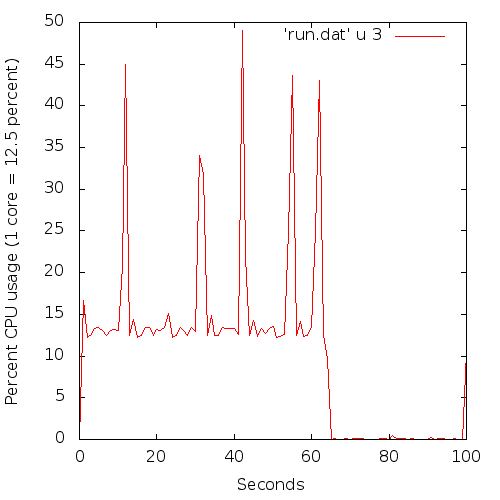
A picture is probably in order:
Note that while this is a short run, it is perfectly representative of what I'm seeing with 'real' jobs too -- I get eight threads auto-spawning (as seen by top), but only one thread is active most of the time.
Basically, most of the time only one core is running at 100% (i.e. showing as 12.5 % here since I have 8 cores), with the other cores occasionally kicking in (the 'spikes').
The wall times is
63 seconds, and the 'cpu time' is 83.1 seconds. Ideally, for a fully parallel run the cpu time should be as close to the wall time multiplied with eight for a shared run like this (but is always smaller).
As a comparison, here's an mpi-enabled binary:
Here all cores are active over most of the (short) run. The cpu time was 9.9 seconds and the wall time 11.8 seconds. For an mpi run the wall time should be as close to the cpu time as possible (but is always larger)
So it's not particularly 'parallel' in the OMP case -- but I don't know why. Maybe nwchem 6.1.1 isn't quite ready for OMP yet? I've noticed that it's one of the areas where the upcoming release is supposed to have been improved.
'profiling' with sar -- how-to
sudo apt-get install syssstat
Edit /etc/default/sysstat:
8 # will be overwritten by debconf!
9 ENABLED="true"
10
sudo service sysstat restart
Before launching the run, set sar to run in another windows and collect data before immediately launching the run you want to monitor in a different window:
sar 1 180 >> run.log
collects data every 1 seconds and repeats it 180 times (i.e. 181 seconds) and stores the data in run.log.